ReserveInbox
Reservation software for restaurants

Every reservation.One team inbox.

Bookings from your website, guests at the door and the waiting list land in one shared list. Your team seats them on the floor plan – in the console and in the staff app.
  • Runs on your own server
  • Staff app for iPhone, iPad and Android
  • German · English · Turkish · Danish
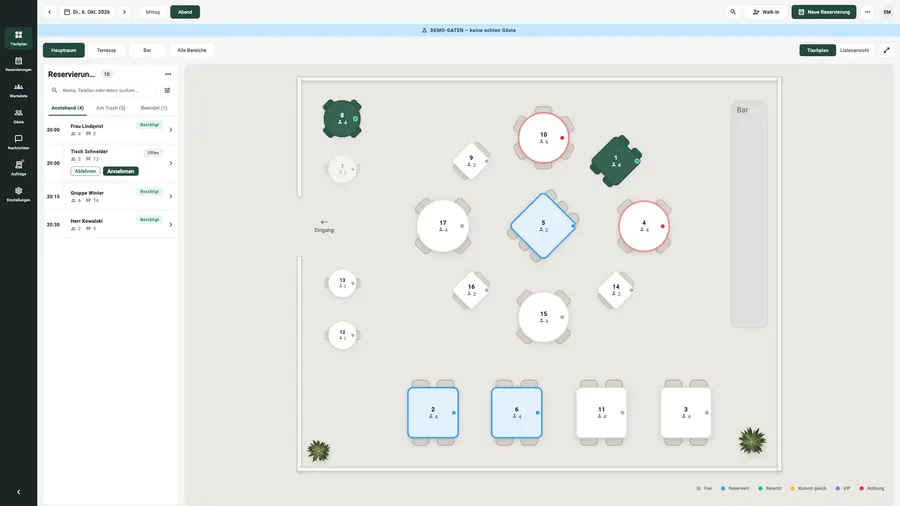
Tablet console of the staff app with an evening’s floor plan (demo data)
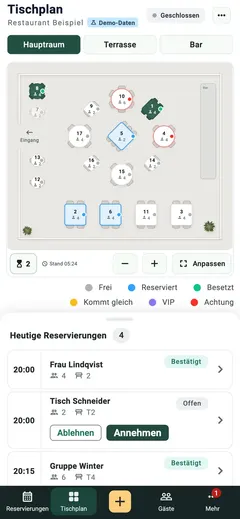
Staff app with the floor plan (demo data)
WebsiteOnline booking
Walk-instaken at the door
Waiting listwith wait time
Floor planlive in service
OfflineEntries wait visibly
4 languagesDE · EN · TR · DA
One shared list

Website, door and waiting list. One list.

Your team no longer works across three channels but in one list that looks the same for everyone.

Bookings from your website

Guests pick the date, time and party size right on your site and change or cancel on their own.

Walk-ins at the door

Spontaneous guests are added in a few taps and appear on the floor plan at once.

The waiting list

Guests join from a QR code at the door and follow their position live; your team sees the estimated wait.

Two halves

The console and the staff app.

The console

Inside your own website administration you set up the floor plan, opening hours, covers caps and confirmations.

  • Draw the floor plan
  • Hours and covers caps
  • Reports and CSV export

The staff app

At the host stand and on the floor your team sees the list and the floor plan and seats guests with one tap.

  • Seat and free tables
  • Scan the arrival QR
  • Works offline too
During service

What your team does with it.

A floor plan, not a spreadsheet

Draw rooms, tables and combinations; the evening runs live on the plan.

Arrival by QR

The guest shows a code, the tablet scans it – the table switches to “seated”.

QR menu and ordering at the table

A multilingual menu with allergens; orders reach the kitchen and the bar.

Permissions per seat

The host stand sees phone numbers, service sees only the floor plan – set per device.

Offline is the normal case

Keep working without Wi-Fi; entries wait visibly and are sent later.

Confirmations in the guest’s language

14 templates – received, confirmed, reminder, declined – editable per language.

Done & next

What is done. What comes next.

Dated from our releases – what is coming carries its status, never an invented date.

Done

  1. Version 2.27.0 on the demoPayment policy in test mode, segments, sealed allergy notes, day planner.
  2. Staff app 1.3.11 on the App StoreFloor plan, reservations, walk-ins and the console on the iPad.
  3. Guest feedback and live waiting listA question after the visit; a low score reaches the manager at once.
  4. Pacing, table combinations, table blocksCovers cap per interval, joined tables, closures and duration by party size.

Next

  1. The app under the name ReserveInboxVersion 1.3.12 is submitted to Apple for review.
  2. Events with tickets and add-ons at bookingFinished in the code, release 2.28.0 prepared.
  3. Embedding in any websiteBooking page, web component and webhooks – without WordPress as well.
  4. More guest languagesSwedish, Norwegian, French, Spanish, Italian.

No advertising. No analytics tools.

The console runs on your own server. Push notifications to staff travel through the Apple and Google services.

  • No tracking in the app
  • Data on your own server
  • Retention by your rules
  • Export and erasure per guest
Questions

Common questions, briefly answered.

Do my staff need passwords?

No. Each device is enrolled once with a company code; only a checksum is stored, codes expire and devices can be signed off.

What happens when the Wi-Fi drops?

The app keeps working. Entries wait in the outbox and are sent as soon as the connection is back.

Where is the data?

On your own server, inside your own administration. There is no central ReserveInbox cloud in the booking path.

Can I try it first?

Yes. The staff app has a demo mode with sample data and no sign-in. For the console we give you a personal demo.

See ReserveInbox in a personal demo.

We show you the console and the staff app with demo data.

Less admin. More hospitality.